

Start the school year off right with fibre-powered Internet
Get the speed you need to ace student life. Whether you’re video chatting with classmates, downloading large files or streaming your favourite show after a long day, we have the Internet package for you.
4 reasons why smart students choose Cogeco
A reliable Internet connection
When something’s due, you just need your Internet to work. Our Internet is powered by our fibre-optic network to give you a connection you can depend on, and the speed you need.
Student-friendly price
Choose from our affordable packages and enjoy seamless connections for all your devices—and all your houseguests. Best of all, you’ll have money left over for pizza.
Installation that suits your needs
Choose between our easy self-install kit and getting it done by one of our helpful techs. Either way, you’ll get up and running in a flash so you can start hitting the books.
100% local support
We’re here to help make your school year stress-free. You stay on top of your work and we’ll make sure you have reliable Internet, especially during those all-night study sessions.
Why shop online?
Unbox. Install. Connect. It's that simple!
Free installation—online only.
Save time - shop here for instant top deals.
Easy-peasy sign up, let's go.
All our unlimited packages include:

Advanced Wi-Fi 6 technology
Get a strong and reliable connection on every device.
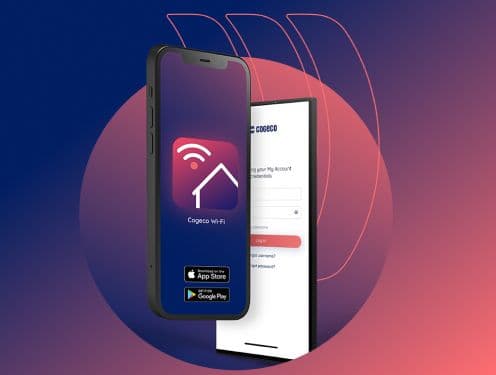
An intuitive Wi-Fi app
Control and manage your network with ease using the Cogeco Wi-Fi app.

Free Cogeco Security licences
Browse safely and protect your hard work on 2 devices of your choice for free.
Good friends get friends a good deal. Refer a friend and get $100 each.

Your questions about Internet, answered
Yes, under certain conditions, you may be able to install your Internet, Phone and/or TV service yourself. You will need some basic technical skills to install the hardware, but we'll send you a kit with detailed instructions and everything you need to complete the work. Instructional videos and step-by-step guides are also available on our support site.
To see if you qualify for self-installation and arrange for a kit to be delivered, please contact Customer Service (see Residential or Business contacts). We'll need to confirm the following:
- Your address has active service from a previous installation.
- The services you are interested in are available (TiVo, for example, requires a professional installation to connect the equipment on a home network).
- There are coaxial outlets already installed at the locations where you want service.
If you’re installing your services yourself, we’ll send you a Self-Install Kit containing all the equipment you’ll need, as well as any cables and instructions.
Good to know: If you live in a Fibre-to-the-Home area, a technician will be required to install your services. See here for more information.
To get the fastest Internet speeds, you’ll need the latest equipment from Cogeco and devices in your home that can handle the speed. See below for more info on our equipment and what your devices will need.
About the Cogeco equipment
Our fastest Internet speeds are only available on our latest equipment. When you upgrade your Internet, we’ll make sure that your modem is capable of reaching the new speed and replace it if needed. To get the best coverage throughout your home or business, you may also need Cogeco Wi-Fi extenders.
Good to know:
- The speed on each device can vary depending on how far away from the modem it is and if there’s anything nearby that could interfere with the signal.
- To reach our fastest speeds, you’ll need to connect your devices directly to your modem using an Ethernet cable and to reach speeds over 1 Gbps you’ll need to connect to the modem’s 2.5G (orange) Ethernet port. Learn more about optimizing your Wi-Fi network.
- Note: The Cogeco Wi-Fi Extender also has a 2.5G WAN port to connect to the modem for improved Wi-Fi signal, but does not have a 2.5G LAN port to provide wired speeds above 1 Gbps.
About your devices
There are many factors that affect the speeds you can reach on your individual devices like computers, smart TVs, mobile devices and gaming consoles. These factors include:
- The type and age of the device
- The operating system
- The web browser and other applications running on the device simultaneously
- Other online activities in your home or business happening at the same time on other Internet devices
Keep in mind that your Internet speed is distributed among the number of devices connected simultaneously and that the speeds may vary depending on each device’s capability.
Good to know: Older devices can slow down your entire network since some modems need to switch to an older Wi-Fi protocol to communicate with them.
Recommended system requirements
- Current Microsoft, Apple or Linux operating system (Linux not supported by Cogeco)
- Gigabit Ethernet Network Card
- To reach speeds over 1 Gbps, you’ll need a 2.5G network card.
- Cat6 Ethernet Cable
Devices that don’t meet the recommended requirements may not be able to reach the maximum speeds.
The Cogeco Wi-Fi app is an easy-to-use app that lets you set up and monitor your Cogeco Wi-Fi network from your mobile device. You can check your network health at a glance, see who’s logged in throughout your home, manage your network name (SSID) and passwords, and even improve your online experience with features such as threat protection and ad blocking.
Note: The app is only compatible with Cogeco Wi-Fi Pods, extenders and certain modem models. If you need to use the app to set up your modem, this will be covered in your modem’s setup instructions. If you want to order Cogeco Wi-Fi Pods or extenders, please contact customer service.
Where can I get the Cogeco Wi-Fi app?
The Cogeco Wi-Fi app is available for free on the iOS App Store and Google Play Store.
Note: The Cogeco Wi-Fi app is made by Plume, which has a similar app called HomePass, but you must be using the Cogeco Wi-Fi app for it to work with your Cogeco service.
How do I sign in?
When prompted to sign in, enter your Cogeco My Account username and password.
Don’t have a My Account profile yet? Register here.
What can I do with the app?
The app is separated into a few main sections that you can select from the bottom of the screen: Home, People & Devices and Menu & Settings.
Home
The home screen is a one-stop shop to monitor your network. It’s separated into sections, and you can change the order of those sections by selecting Personalize layout at the bottom of the screen.
- Guard is where you can manage your security settings and view events, such as blocked websites. Learn more about using Guard.
- Sense uses devices in your home to provide motion detection. Learn more about using Sense.
- Adapt shows the status of your Wi-Fi network and it’s also where you can manage your network name and passwords. Learn more about managing your network name and password.
- Nodes shows the status of your Wi-Fi pods, extenders and connected devices. Learn more about checking your network performance.
People & Devices
People & Devices is where you set up profiles for the people in your home and manage connected devices.
Menu & Settings
Menu & Settings is a central place to view all of the settings for different features. Most of these settings can also be found where you manage your features on the Home or People & Devices screens.
You can also select FAQs to view our support articles on Wi-Fi and the app, or select Call us to speak with a local rep.
Webmail is offered free of charge to all Cogeco Internet customers. It's easy to set up, use, and it lets you:
- Access your emails securely whenever you want, with any device that's connected to the Internet.
- Store up to 1 GB of data if you're a residential customer, or up to 2 GB if you're a business customer.
- Create folders to organize your emails.
- Save your contacts in an address book with all the features you need (e.g. creating customized distribution lists, importing or exporting contacts, finding all the info about a specific contact quickly and easily, and saving the history of email exchanges).
- Transfer your emails to the address of your choice, automatically.
How do I access Cogeco Webmail?
You can access Webmail by clicking the envelope icon located on almost every cogeco.ca page in the top-right corner.
Want to shop with a local agent or find a store in your area?
Chat with an agent
We’re here to help you and suggest products and services, promotions and answer questions.
Find a Cogeco store
Do you prefer shopping in person? We’re happy to serve you at your local Cogeco store.